
Create Professional News Videos in Minutes.
Create engaging news and social videos with ready-made templates, powerful editing tools, AI voice, media support and fast export — right from your phone.
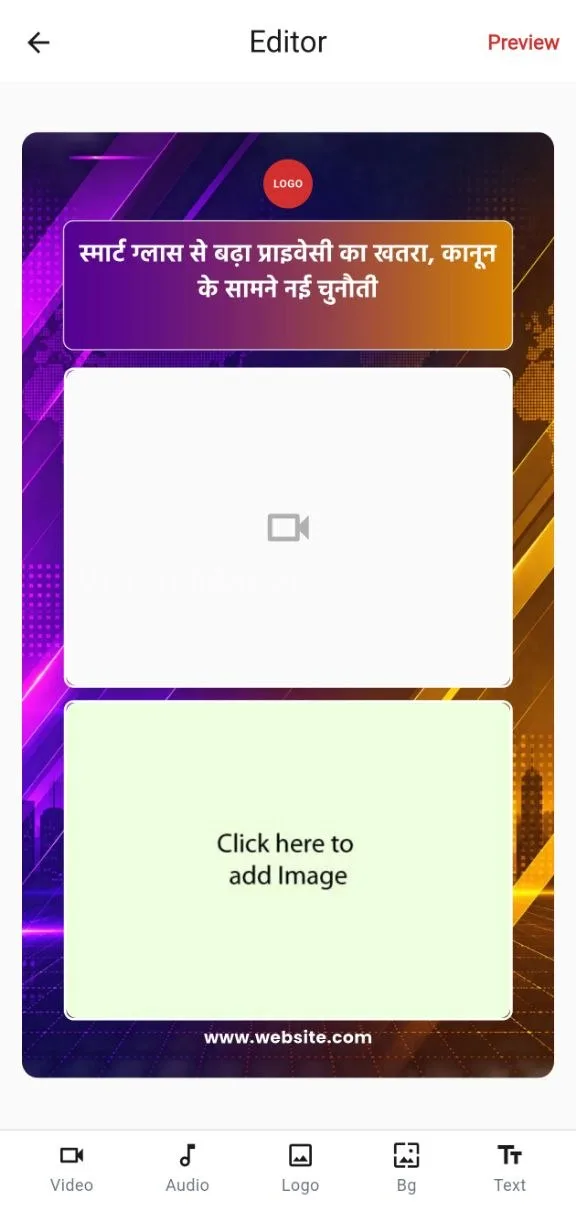
Everything you need to create professional news videos.
From the first template to the final export, every tool lives in one focused editor — no switching apps, no guesswork.
Ready-made Templates
Professional news templates organized by category, ready to customize in seconds.
Powerful Video Editing
Text, fonts, colors, logo, background, shapes and more — full control over every element.
AI Voice
Turn written text into a spoken voice-over for your video, right inside the editor.
GIF & Media Support
Add your own videos and photos, plus GIFs and stickers from the built-in library.
Fast Export
Choose Fast, HD or High Quality — pick the balance of speed and quality that fits the moment.
Multiple Video Formats
Export in 9:16, 16:9 or 1:1 — built for every platform your story needs to reach.
Start with a professional template.
Browse templates organized by category — Shorts Video, Square Video, 16:9 Videos and YouTube — each built for a specific platform and format. Pick one, and your layout, styling and structure are already done.
- Categorized template library
- Free and Premium templates, clearly labeled
- Full preview before you start editing

Customize every detail.
Adjust text, fonts, sizes, colors and alignment. Add your logo, choose a background, drop in your own photos or videos with crop and trim, and layer in shapes, GIFs and stickers.
- Text: font family, size, alignment, custom colors
- Logo positioning with a saved-logo shortcut
- Video & photo crop, trim and background library


From idea to export in three steps.
The same flow shown inside the app — no separate walkthrough needed.

Choose a Template
Pick a professional template that fits your story and platform.

Add Your Content
Add text, images, logo, music and customize it easily.

Export Your Video
Preview and export your video in the quality you need.
A template for every kind of story.
Shorts Video, Square Video, 16:9 Videos and YouTube — organized so you find the right format fast.
Clean Portrait
Shorts Video · 9:16
YouTube Story
YouTube · 16:9
Shorts Video
Shorts Video · 9:16
Breaking Story
Square Video · 1:1Create for every platform.
Every template exports in the format it was built for — no separate conversion step.
9:16 Vertical
Built for Shorts, Reels and Stories — full-screen on mobile feeds.
16:9 Landscape
The standard widescreen format for YouTube and broadcast-style videos.
1:1 Square
Fits perfectly into feed posts without cropping.
Export quality, on your terms.
Three quality tiers, so you choose what matters more for this video: speed or detail.
Quick & light
Quickest export, optimized file size — great for quick shares.
Balanced
Balanced speed and quality — the best choice for most videos.
Maximum detail
Highest visual quality, larger file — export takes longer.
Turn your story into a voice.
Type your script, choose a voice, and generate a spoken voice-over — right inside the editor. Preview it before you decide to use it.
Pick a voice
Choose from the available voice options, including free and premium.
Write your script
Enter up to 500 characters of text for this voice-over.
Preview & apply
Listen first, then apply it to your video or try again.
Available as part of the audio options, alongside original audio, background music and your own recorded or uploaded voice-over.
Bring your own media, or use ours.
Use your own photos and videos with crop and trim, add GIFs and stickers from the built-in library, layer in shapes, and pair it all with music from the curated library or your own recorded voice-over.

Simple plans, no surprises.
Start free. Upgrade any time for premium templates, more exports and AI voice access.
Free
Everything you need to get started.
₹0 forever- Free templates
- Standard export quality
- Daily free export limit
Premium Monthly
For creators publishing regularly.
₹199 per month- Every premium template
- Premium backgrounds, music & AI voice
- Watermark-free exports
- Priority support
Premium Yearly
Best value for the full year.
₹1999 per year · 2 months free vs monthly- Everything in Premium Monthly
- Lower effective monthly price
- Priority support
Prices shown in INR. See Refund & Cancellation for how billing and cancellation work.
Designed for creators who move fast.
A closer look at the real screens you'll use every day.


A news video maker app built around templates.
Whether you need a quick news short for Instagram and YouTube Shorts, a full news reel, or a landscape video maker for news for your channel, News Video Maker gives you a template-first workflow to create news videos without starting from a blank screen. Every template in the library is organized by category and format, so you move from headline to finished video in minutes.
News Video Maker works well as a YouTube news video maker for channel uploads, a news shorts maker for quick vertical stories, and a broader news video templates library for anyone who publishes regularly — journalists, local news pages and independent creators alike.
Frequently asked questions.

Your next news video starts here.
Pick a template, add your story, and export in minutes — free to start, no editing experience required.
Download News Video Maker